A centralized Payments Page has been implemented to streamline the management of customer payments. This interface provides a comprehensive view of all payment information, ensuring that all stakeholders can easily access and manage financial data.
Centralized Payments Page
The centralized Payments Page offers a single interface to view and manage all customer payments. This page features a configurable table where users can see totals, statuses, and related invoices.
Table Configuration Options
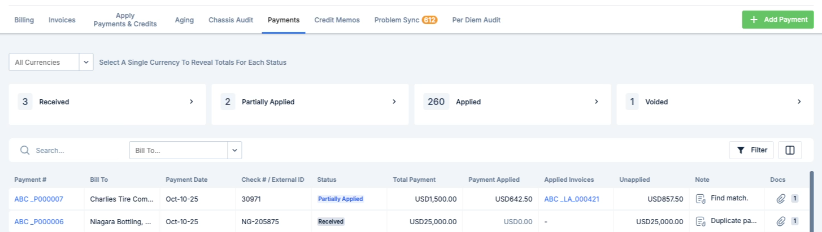
Custom Column Visibility Controls: Users can tailor the table to show or hide specific columns based on their needs.
Filter Panels: Ensure efficient searches by utilizing the filter panels available on the interface.
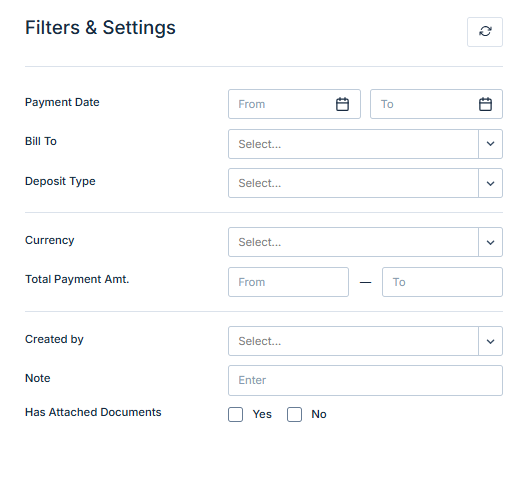
Available Filters
The system offers the following filters to refine payment data:
Customer
Date Range
Status
Currency (only in multi-currency setups)
Multi-Currency Support
For accounts enabled with more than one currency, a currency selector becomes available on the Payments Page.
Currency Selector Appearance: This feature is designed to automatically appear when multi-currency is enabled, offering a seamless experience.
Hide Functionality: If the account supports only a single currency, the selector is hidden to maintain a clean and user-friendly interface.
Was this article helpful?
That’s Great!
Thank you for your feedback
Sorry! We couldn't be helpful
Thank you for your feedback
Feedback sent
We appreciate your effort and will try to fix the article